Two min. tech. tip – Introducing Ziggi (great product+great price=great for schools)

ziggi

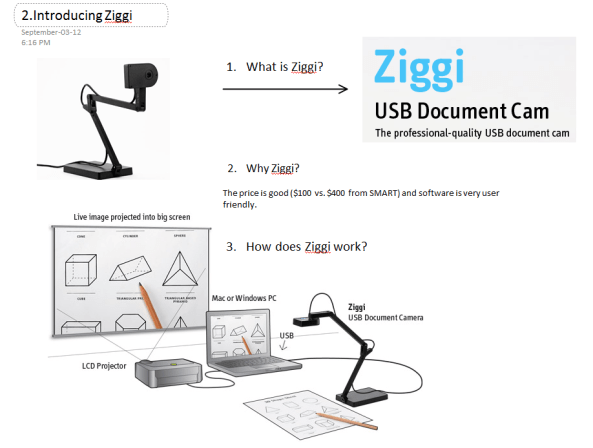
Having a document camera (like Ziggi) available in the class allows teachers to instantly display materials to everyone using their projector. Whether you want to demonstrate an excellent piece of student writing, a math solution, a science experiment or a diagram from a social studies textbook,  a document camera is a quick and easy way to enhance those teachable moments.

Here is a link to the Canadian supplier of this device.

A list of 50 ways to use a Document Cameras in the classroom: http://www.edtechnetwork.com/document_cameras.html

My Top 3 Social Bookmarking Sites

Surfing the web for resources for your students is great but is pretty time consuming! How do you keep track and remember that awesome site you found for your students 2 weeks ago?! And which computer/device did I use?!

Thankfully, there are a number of web-based tools that can help you select, collect and share great sites on topics important to you and your students. All these below tools are accessible on a number of browsers (Chrome, Internet Explorer, Safari…) and devices (like smartphones or tablets like IPads).

delicious

1. Delicious – An oldie but a goodie that was sorely neglected but recently acquired by the YouTube founders Chad Hurley and Steve Chen so it is more actively support and updated. You can save (and tag) websites so you can visit and access later. I have been using this site for a quite a while and use it often when reading online on the web or (more likely on the IPad with hot beverage at the ready.) Here is a link to my delicious account. Feel free to search through the tags for useful sites. I collect links on this site after browsing through Apps like Zite, HuffPost, TrapIt and the ever popular Flipboard. While reading on IPad, I collect links on my topics of interest for everyday teaching practice or sites to share with colleagues. As for browser support there are a number on Chrome extensions or add-ons for Firefox and Internet Explorer.

diigo

2. Diigo – is similar to Delicious for saving sites with the additional options to highlight and add notes to specific pages.  See this video for more information on getting started.

pinterest

3.  Pinterest – It is impossible to ignore the fastest growing  (and 3rd most popular now) social media site behind Facebook and Twitter. Finding resources is as easy as visiting the site and searching under Education. Many of our kindergarten and primary teachers have accounts (One told me she was the “queen of Pinterest” but I am not saying who) and have been collecting excellent ideas and “Pin” ideas regularly for their classrooms and beyond.

Thanks to everyone for their ideas and advice for this tip and others too. Honourable mention should definitely go to Instapaper too as an excellent app that I use to collect and read articles for specific offline use. Personally, I use Instapaper for a quick and easy and not “internet reliant” way to access articles on detailed instructions on how to do something with a quite a few steps  i.e. A teacher’s guide to using Evernote for portfolios etc.

My top 3 Cloud Storage Apps

If you have ever asked…where IS that file!? Cloud storage sites are an excellent way to store and access your important files on multiple devices like tablets, smartphones  or multiple computers. All provide FREE space and are a perfect alternative to the increasingly unreliable and easily lost USB drives.

My favourites are:

  1. Dropbox: The most popular and user-friendly app; available in the widest variety of apps; storage; great for collaboration and sharing folders with friends and  starts at 2 GB with lots of ways to earn free space
  2. Microsoft SkyDrive: allows you to access your files from any computer; 7 GB of free storage (25GB for Hotmail/MSN users)
  3. Google Drive: Integrates well with Gmail and can display an excellent variety of file types; My favourite for sharing “one-off” files quickly; 5 GB of free storage

All these applications are excellent for sharing files like photos or videos and handy for collaborating on projects with multiple editors and writers. Files and projects can be stored in an online folder rather than having multiple versions emailed back and forth. In all of the above sites, each file becomes a link that is easy to share in messages or posts.

For more information and a pretty comprehensive review of cloud storage options, please feel free to visit the below article.

http://www.theverge.com/2012/4/24/2954960/google-drive-dropbox-skydrive-sugarsync-cloud-storage-competition

Two min. tech. tip #8 – Welcome to the Class Dojo!

We are all familiar with the practice of rewarding students and classes with points for specific behaviours and good practices.

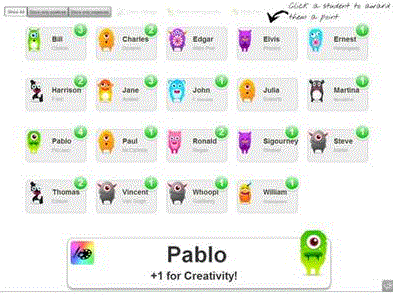
Class Dojo is a free website to aid teachers to record and manage specific learning goals and behaviours to extend this practice further. Students can create their own avatars, check their points at home and their progress is easily displayed on a laptop or SMARTboard or tablet with the app.

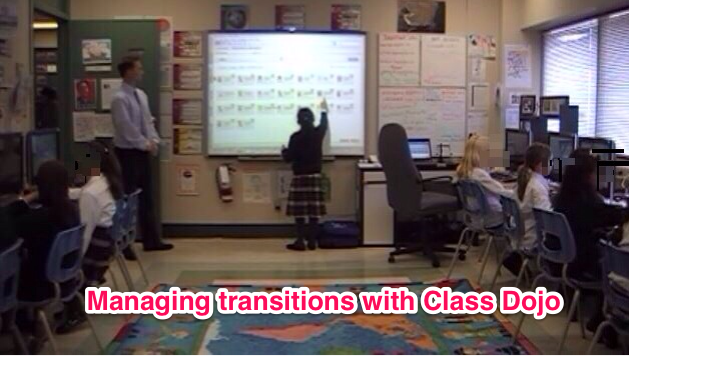
Below is a video of a teacher using Class Dojo to start his class. At my school, I am using the same model to start my class in the computer lab and it works really well. (I created my own “tribute” video that I shared internally to help staff see this app in action.)Here is a screen capture of the video.
cd transition pic
I chose Independence (1 of 6 my skills) for the class as an area of development. When each student enters the class they immediately login to the computer and open their project. Then, they reward themselves by going up to the SMARTboard without asking and giving themselves +1 for independence and then returning to their project.

Overall, Class Dojo is an excellent tool to manage transitions especially when students are arriving at different times. It is student-friendly and a measurable record of progress and success in the classroom. I welcome your feedback and let me know if I can help get you started.

More visuals – http://www.digitalplay.info/blog/2011/11/04/reward-or-punishment-gamification-with-class-dojo/

Introduction to class dojo video for students

Two min. Tech. tip #7 – Using Spotlight Tool

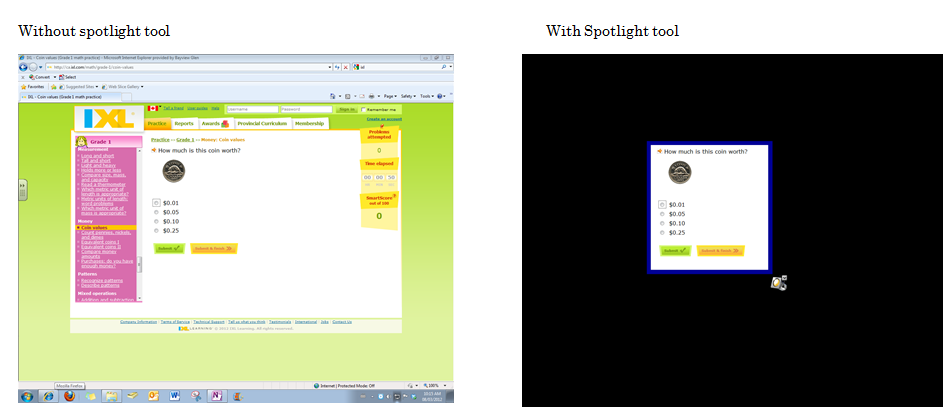
Purpose: In a distracting world (and computer screen for that matter) this SMARTnotebook tool allows you to focus student attention on a particular part of the screen or window.

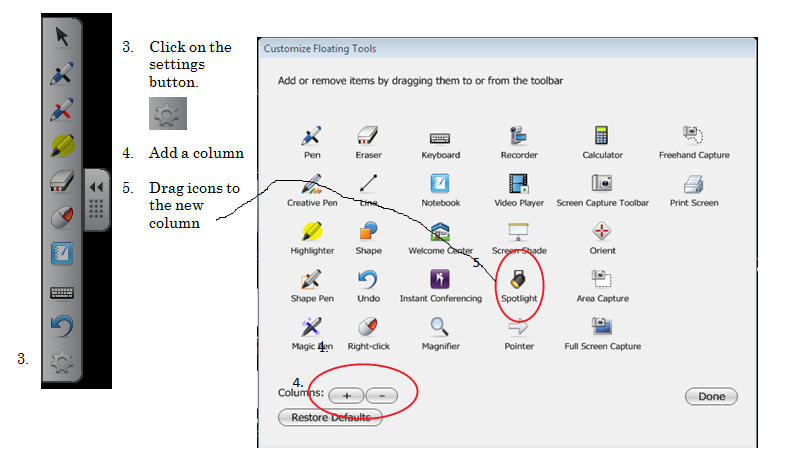
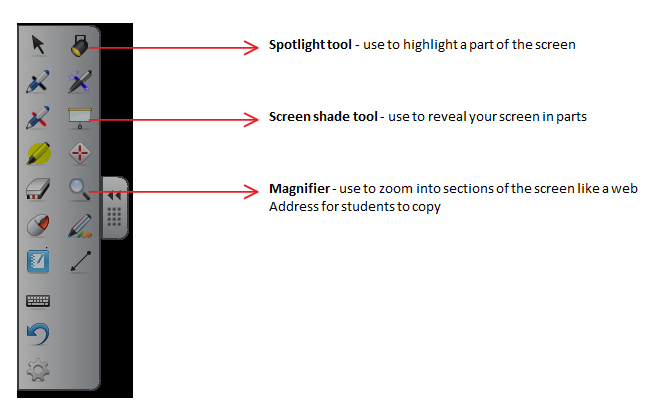
Two min. Tech tip #6 – Customizing your Floating Tools

Purpose: To use floating tools outside of the SMARTnotebook software

Two min. tech. tips

According to Ferris Bueller: “Life moves pretty fast. If you don’t stop and look around once in a while, you could miss it.” The same could be said for technology these days.

This year I am hoping you will take 2 min. to try a few new  ideas and tips from the ever-changing educational technology world. Some you might know, but hopefully you will pick up a few new tricks to improve your tech. skills.

Goal: Training should be quick, relevant and helpful for teachers.

Delivery: weekly to your inbox by email OR by Twitter. Feel free to follow me at @anthonychuter

Follow up: Up to you! Depending on feedback and interest, I can schedule follow-up sessions if a topic, resource or idea needs more attention.  Thanks for reading and I look forward to your feedback!

Anthony

Welcome!

In this professional blog, my goals are to:

  • highlight and review technology that is fun and teaches children to be positive, intelligent and conscientious global citizens.
  • share my experience and perspective as a technology teacher for primary students for over 10 years and self-professed geek Dad of a pre-schooler and a kindergartener, to find teaching practices, lessons, and devices that positively influence their life and learning
  • collaborate and learn with colleagues wishing to integrate technology into their curriculum and extend my PLN globally

I look forward to your comments, discussions and collaborations!

Thanks for your visit.

Anthony

You can contact me at:

http://anthonychuter at hotmail.com

gplus.to/anthonychuter
http://twitter.com/anthonychuter
http://ca.linkedin.com/in/anthonychuter
http://delicious.com/anthchuter
http://www.youtube.com/user/anthchuter