ict4kids.ca

Collaborating with teachers and students to aid learning with technology.

Main menu

Skip to content
  • Home
  • About Me
  • Teaching & Learning
    • Technology Integration
      • Puentedura’s SAMR model
      • Arizona’s Technology Integration Matrix
      • Technology Acceptance Model
    • Digital Badging
    • Computational Thinking
      • What is Computational Thinking?
      • Programming & Scratch
      • K-8 Computational Thinking apps
      • The Hour of Code
    • Digital Citizenship & Literacy
      • Digital Citizenship
      • Keyboarding
    • Digital Portfolios
  • Academic Research
    • Blog – Curriculum Planning and Implementation #EDUC5302g
      • Final Assignment – Using Digital Portfolios To Aid Learning And Showcase Curricular Goals
    • Blog – Leadership and Technology #EDUC5205g
    • Course Journal: ICT in Primary Education MOOC
    • Critical Making EDUC 5199G
      • Provocative Project: What does Assessment look like in Makerspaces? – EDUC 5199G
    • EDUC 5199G – Teaching & Learning with Mobile Technologies – Critically Examining mLearning Tools for K-12 Programmers and Coders
    • Research Methods EDUC5002G
    • Research on Mobile Learning: EDUC5103g
    • WBLT on the Microsoft Surface- #EDUC5104g
    • Social and Cultural Issues in Education #EDUC5005g
    • Blog: Learning with Technology #EDUC5101g
      • Problem 2 – Technology and Standardized testing – Administrator’s perspective
      • Synthesis – Technology’s Promise: How can we leverage technology to aid learning in the 2014 and beyond?
    • Blog: Principles of Learning #EDUC5001g
      • Digital Badging aids Learning and Assessment – Assignment#1
      • Putting Students First: Using Learning Theories to update Projects and Spaces – Assignment #3
    • Other Research

Post navigation

← Two min. Tech tip #6 – Customizing your Floating Tools
Two min. tech. tip #8 – Welcome to the Class Dojo! →
Nov 12 2012

Two min. Tech. tip #7 – Using Spotlight Tool

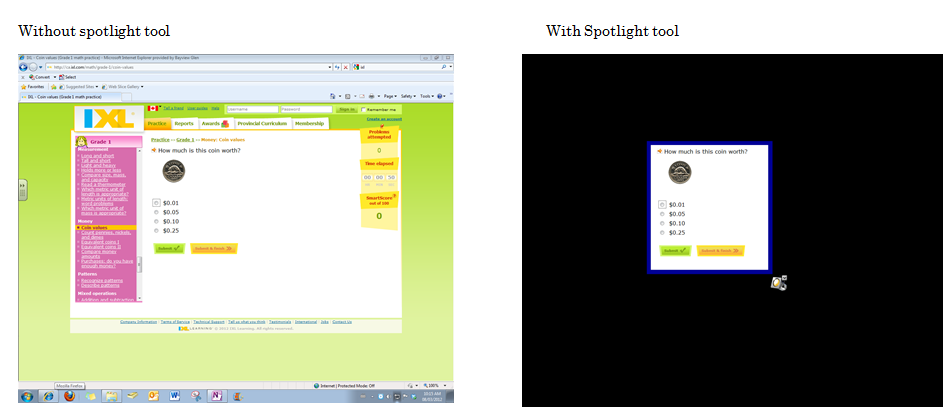
Purpose: In a distracting world (and computer screen for that matter) this SMARTnotebook tool allows you to focus student attention on a particular part of the screen or window.
http://www.youtube.com/watch?v=rRibDkd9Nmk

Share this:

  • Click to email a link to a friend (Opens in new window) Email
  • Click to print (Opens in new window) Print
  • Click to share on X (Opens in new window) X
  • Click to share on LinkedIn (Opens in new window) LinkedIn
  • Click to share on Facebook (Opens in new window) Facebook
  • More
  • Click to share on Reddit (Opens in new window) Reddit
  • Click to share on Tumblr (Opens in new window) Tumblr
  • Click to share on Pinterest (Opens in new window) Pinterest
  • Click to share on Pocket (Opens in new window) Pocket
Like Loading...

Related

By achuter • Posted in educational technology, professional development, smartboard
0

Post navigation

← Two min. Tech tip #6 – Customizing your Floating Tools
Two min. tech. tip #8 – Welcome to the Class Dojo! →

Leave a comment Cancel reply

This site uses Akismet to reduce spam. Learn how your comment data is processed.

Latest Twitter Activity

My Tweets

Word Cloud

assessment badging blackboard class management collaboration creativity curriculum digital citizenship educational technology elearning flipteaching game_based_learning ICT curriculum ipad keyboarding leadership Microsoft mobile learning OneNote professional development programming research smartboard software tablets teachers technology integration video windows writing

Search

Common Sense Certified Educator: EdTech Mentor

MIE

Recent Posts

  • Microsoft Learning Tools: powerful for exceptional learners…make that all learners
  • How OneNote aids staff collaboration – OneNote in Education Part 2 of 3
  • Adventures in Badging – Comm Tech 2017/8
  • Why self-directed learning is a powerful opportunity for educators
  • OneNote is my ultimate curation and organizational tool – OneNote in Education Part 1 of 3
  • Can you code on a mobile device? – Critically Examining mLearning Tools for K-12 Programmers and Coders
  • What does Assessment look like in Makerspaces?
  • Exploring Critical Making as an approach to learning for teachers and students
  • My top 3 designing & coding moments from this term to honour Computer Science Week 2015
  • Using Digital Portfolios To Aid Learning And Showcase Curricular Goals

Archives

  • July 2019 (1)
  • August 2018 (1)
  • July 2018 (3)
  • August 2016 (1)
  • April 2016 (1)
  • January 2016 (1)
  • December 2015 (1)
  • July 2015 (1)
  • May 2015 (1)
  • April 2015 (1)
  • March 2015 (1)
  • February 2015 (1)
  • January 2015 (1)
  • November 2014 (1)
  • September 2014 (1)
  • August 2014 (1)
  • July 2014 (1)
  • June 2014 (2)
  • May 2014 (1)
  • April 2014 (2)
  • January 2014 (2)
  • December 2013 (1)
  • October 2013 (1)
  • August 2013 (1)
  • July 2013 (5)
  • June 2013 (1)
  • May 2013 (2)
  • April 2013 (2)
  • March 2013 (2)
  • February 2013 (1)
  • January 2013 (3)
  • December 2012 (1)
  • November 2012 (3)
  • October 2012 (4)
  • September 2012 (3)
  • June 2012 (1)
  • April 2012 (1)
  • January 2012 (2)
  • October 2011 (1)
  • September 2011 (1)
  • June 2011 (1)
  • May 2011 (2)
  • April 2011 (2)
  • March 2011 (2)

Enter your email address to follow this blog and receive notifications of new posts by email.

Join 58 other subscribers
Follow ict4kids.ca on WordPress.com

Follow me on Twitter

My Tweets
Blog at WordPress.com.
Privacy & Cookies: This site uses cookies. By continuing to use this website, you agree to their use.
To find out more, including how to control cookies, see here: Cookie Policy
  • Comment
  • Reblog
  • Subscribe Subscribed
    • ict4kids.ca
    • Join 58 other subscribers
    • Already have a WordPress.com account? Log in now.
    • ict4kids.ca
    • Subscribe Subscribed
    • Sign up
    • Log in
    • Copy shortlink
    • Report this content
    • View post in Reader
    • Manage subscriptions
    • Collapse this bar
 

Loading Comments...
 

    %d